Vibe Coding: The Complete Guide to Professional AI-Assisted Development
By Pradhyuman,
The Revolution Nobody Talks About
Right now, as you read this, 41% of all code being written globally is AI-generated. That's 256 billion lines of code in 2024 alone. At Amazon and Google, roughly 30% of their codebase comes from AI. Meta expects that number to hit 50% within the year.
But here's the uncomfortable truth nobody wants to say out loud: 40-45% of that AI-generated code contains security vulnerabilities.
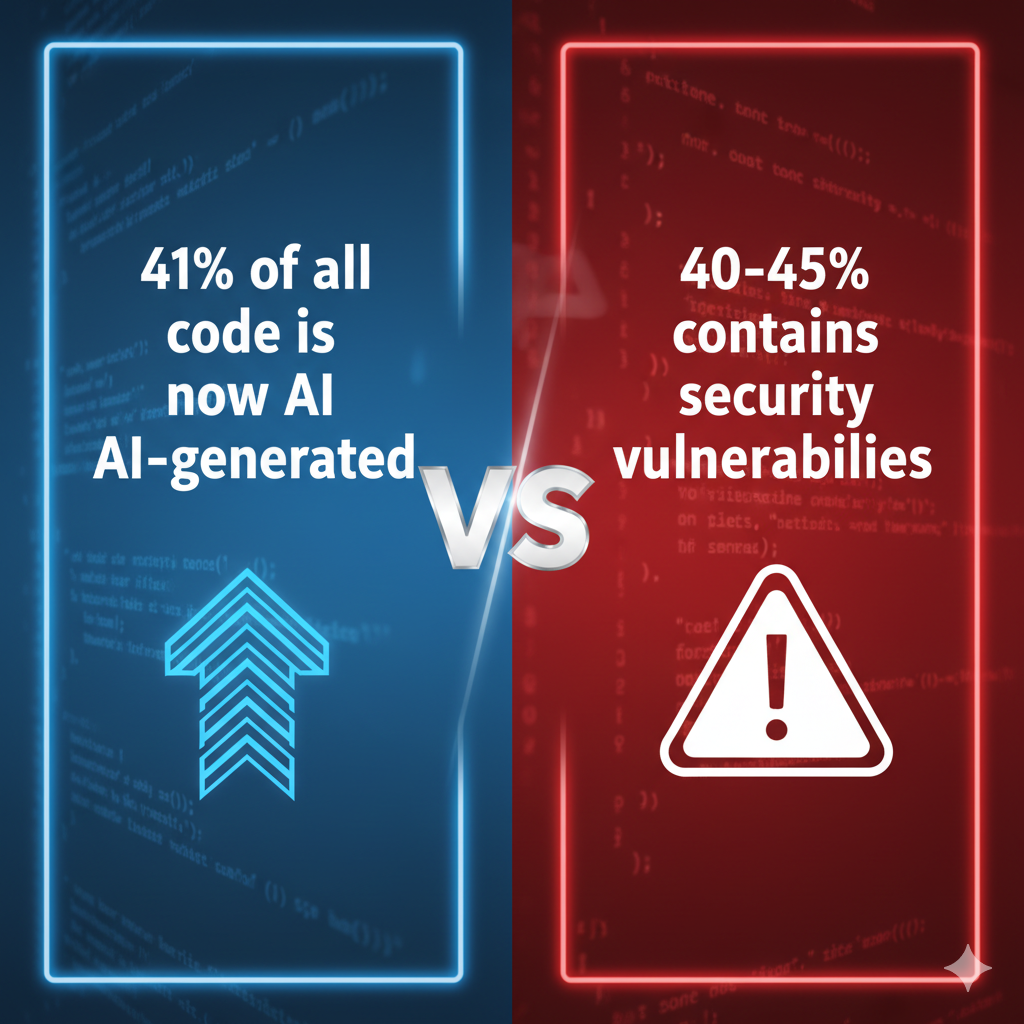
This isn't a story about AI replacing developers. This is a story about the massive gap between "code that works" and "code that belongs in production" - and how the best engineering teams in the world are bridging that gap.
The 70% Problem: Why Most Vibe Coding Fails
Let me tell you about something I call the 70% problem. It's the invisible wall that separates hobbyists from professionals in the age of AI-assisted development.
AI coding assistants are phenomenal at getting you 70% of the way to a working solution - and they do it remarkably fast. You describe what you want, it generates code, you run it, and boom: it works. You get that intoxicating "ship it!" energy. Your prototype is running. The feature is functioning. Why wouldn't you push to production?
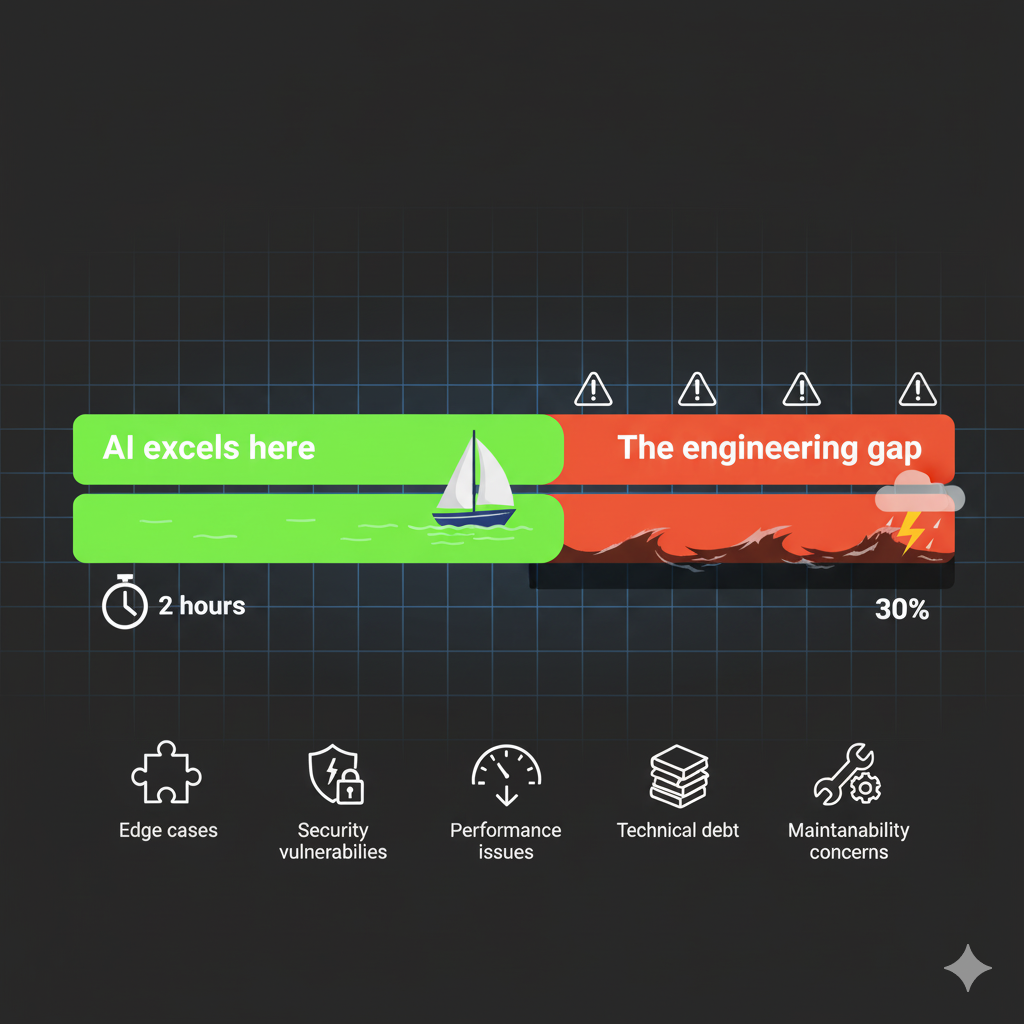 Because that final 30%? That's where all the actual engineering happens. That's where you discover:
Edge cases AI didn't consider - What happens when the user inputs an emoji? A 10MB file? An empty string? A SQL injection attempt?
Security vulnerabilities from missing input validation - AI forgot to check if that email is actually an email, or if that URL points to localhost
Performance bottlenecks from inefficient algorithms - That O(n²) solution works fine with 10 items, but collapses with 10,000
Code that will be impossible to maintain - Six months from now, nobody (including you) will understand what this does
Technical debt time bombs - Shortcuts that seem fine today but will cause cascading failures tomorrow
Here's a real statistic from production systems that should terrify you: Over 7% of AI-generated code gets reverted within two weeks - double the rate from 2021 before widespread AI adoption.
Why? Because people ship that 70% solution without doing the hard work on the remaining 30%.
The difference between successful AI-assisted development and failed AI-assisted development isn't the tool you use. It's whether you bridge that 30% gap with actual engineering discipline.
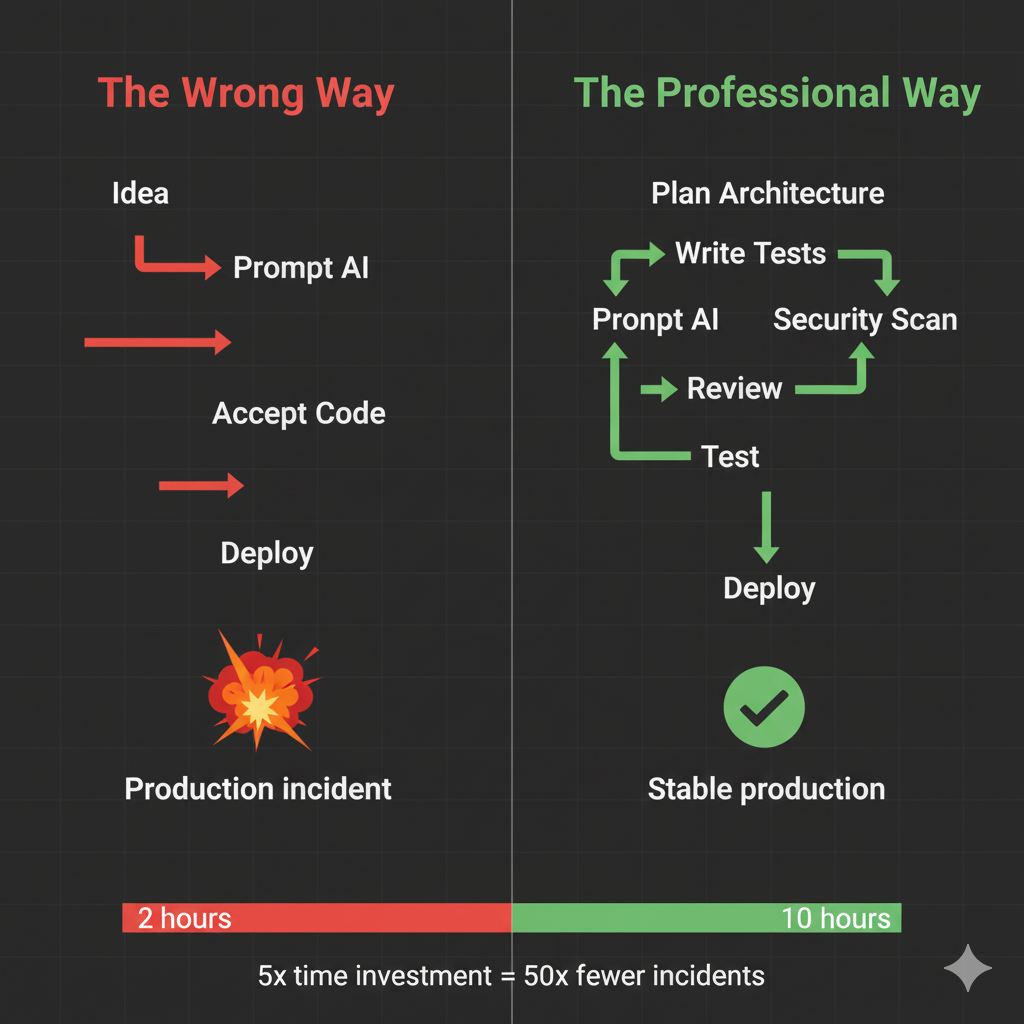
The Professional Framework: Five Non-Negotiable Steps
The teams shipping production-ready AI-assisted code don't have magic. They have discipline. They follow a framework that transforms vibe coding from a prototype tool into a professional practice.
Step 1: Plan First (Don't Let AI Decide Your Architecture)
This is where most developers fail immediately. They open their AI coding assistant and start prompting: "Build me a user authentication system." The AI happily complies, and suddenly you have code you don't understand implementing an architecture you didn't design.
You own the architecture. AI is your implementation assistant.
Before you write a single prompt, create three documents:
requirements.md - What should happen (not how)
Core features
User flows
Success metrics
Technical constraints
plan.md - How you'll implement it
Architecture decisions
Technology choices (with justifications)
Database schema
Security approach
Deployment strategy
tasks.md - Broken into actionable checkboxes
Small tasks (1-3 story points maximum)
Logical execution order
Dependencies noted
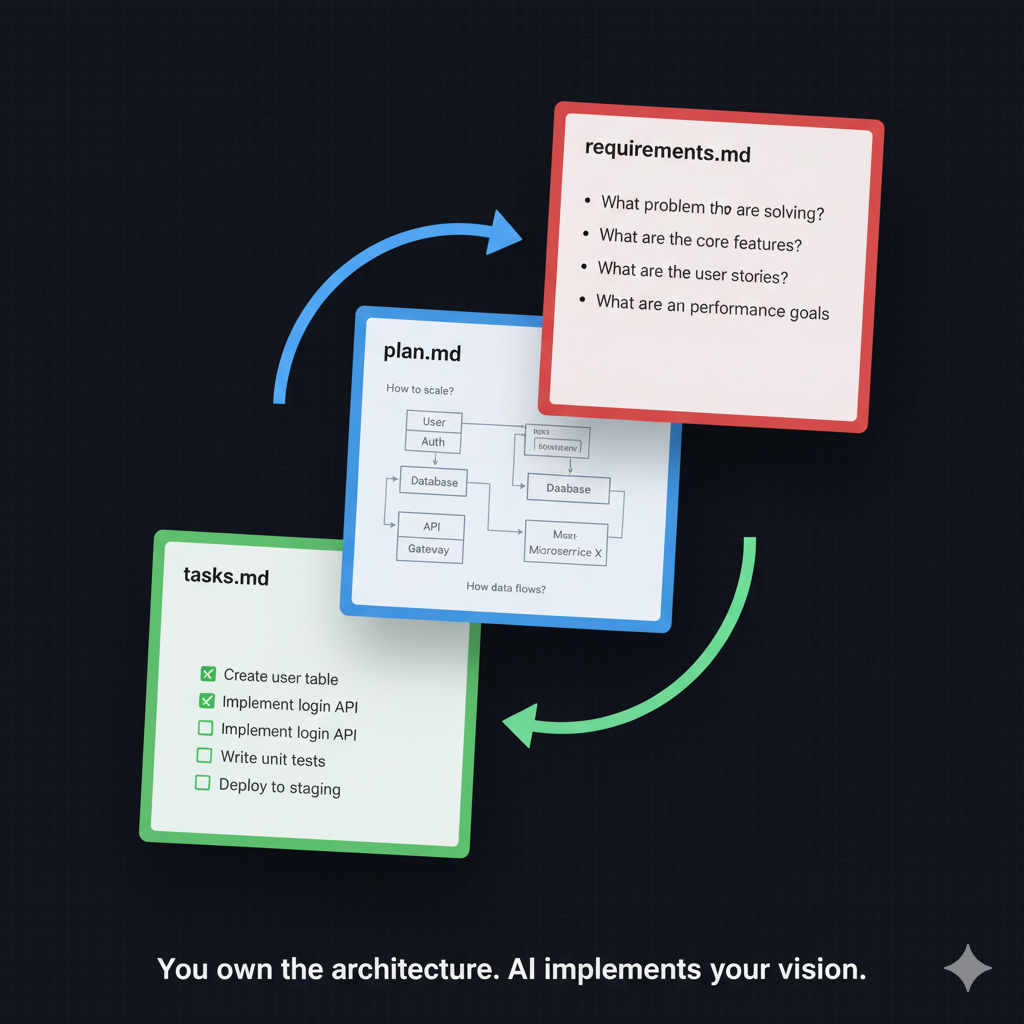 This isn't bureaucracy. This is you maintaining control. When AI generates code, it has your blueprint to follow instead of inventing its own.
Step 2: Prompt with Precision
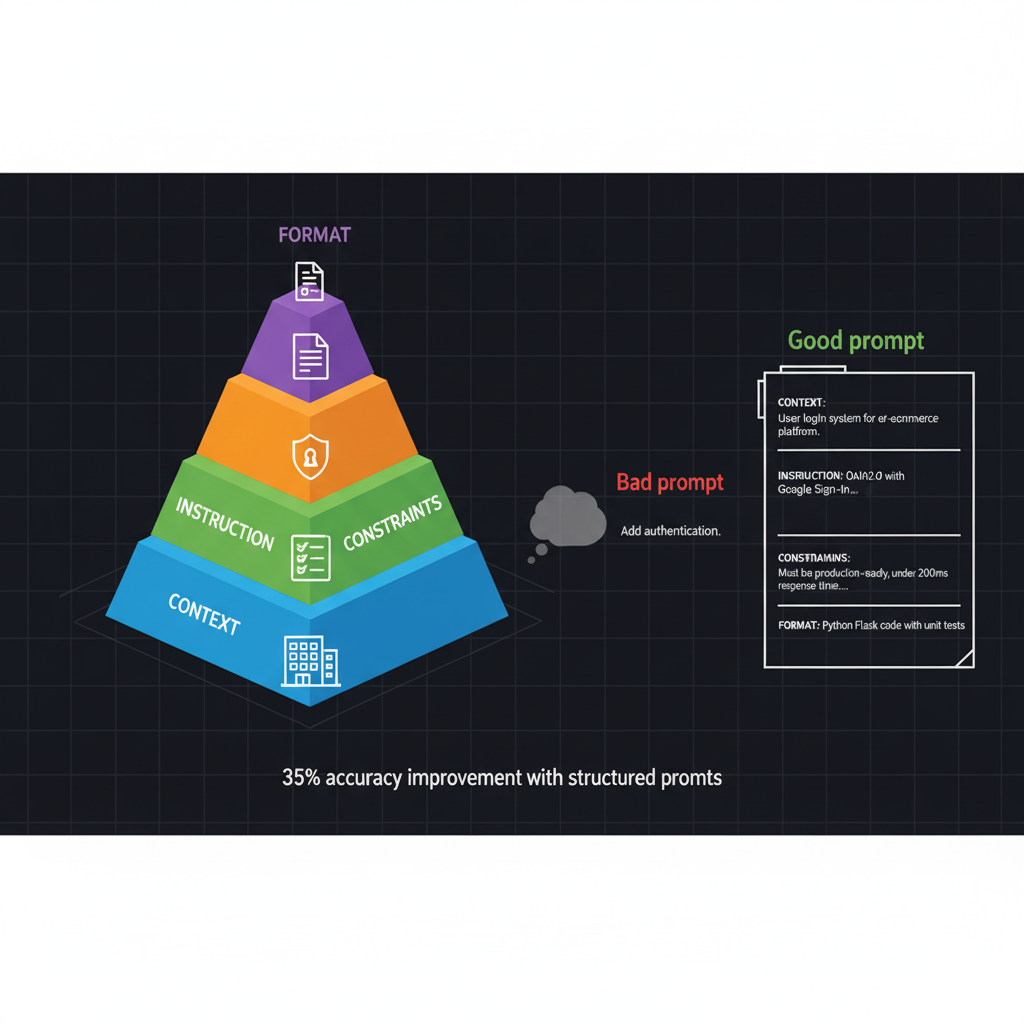
Every prompt needs four components. Miss one, and you're asking for hallucinations and security vulnerabilities.
The Four-Component Prompt Structure:
Context - What you're building and why
Instruction - The specific task to complete
Constraints - Security, performance, style requirements (explicit, not assumed)
Format - How you want the output structured
Example of a bad prompt:
"Add user authentication"
Example of a professional prompt:
Context: Building a Flask API for a todo app with PostgreSQL database.

Instruction: Implement user registration endpoint that accepts email and password.

Constraints:
- Use bcrypt for password hashing (minimum 12 rounds)
- Parameterized SQL queries only (no string concatenation)
- Return 400 for invalid email format
- Return 409 if email already exists
- No sensitive data in error messages
- Follow OWASP authentication guidelines

Format: Python function with type hints, Google-style docstring, comprehensive error handling, and example usage.
Notice what's explicit here: security requirements are spelled out. You're not assuming AI knows to use bcrypt or parameterized queries - you're mandating it.
Research shows this approach improves accuracy by 35%.
Step 3: Build Incrementally (Tiny Tasks, Constant Validation)
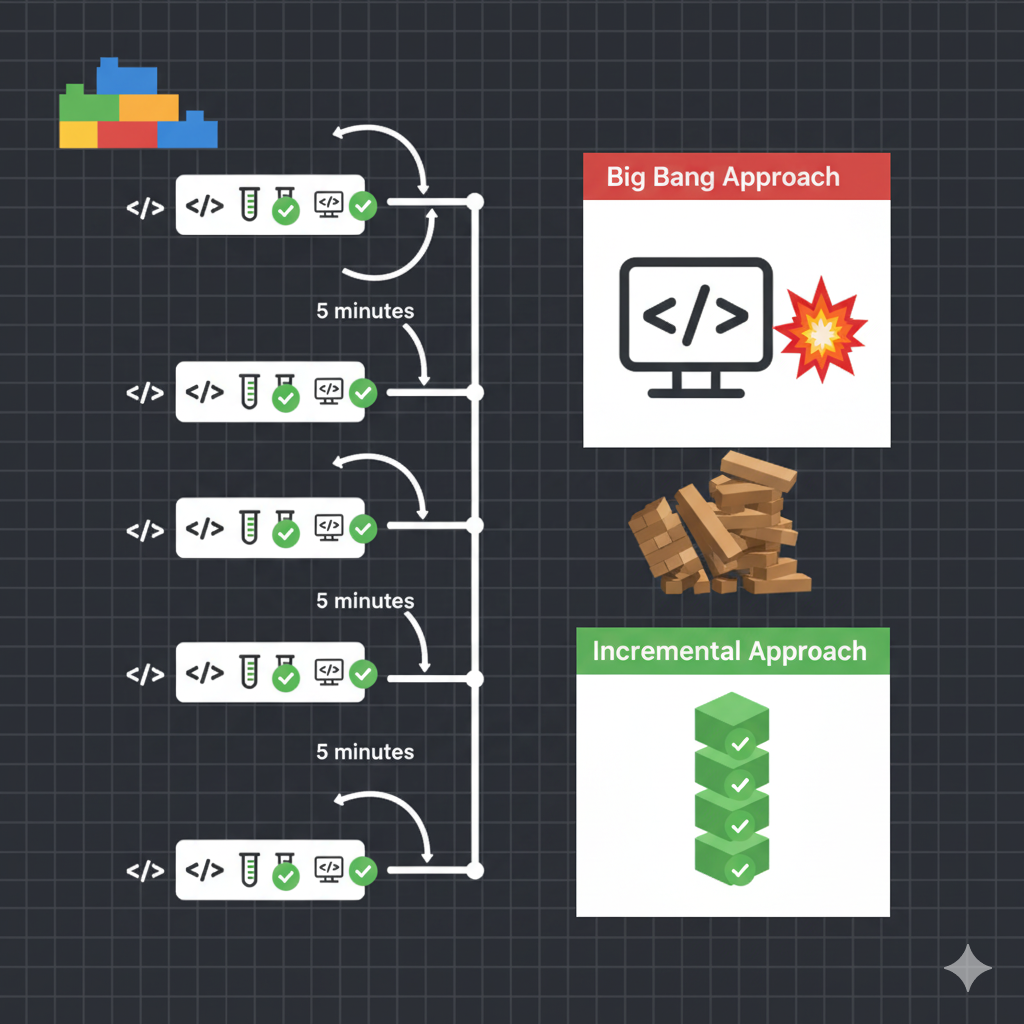
AI works best on small, discrete tasks. Break everything into 1-3 story point chunks.
The Rule: One function at a time. Test after every change. Git commit liberally.
Bad approach:
"Build a complete user authentication system"
[AI generates 500 lines of code]
[You run it and something breaks]
[No idea which of the 500 lines is the problem]
Professional approach:
Step 1: "Write password hashing function"
        [Test it]
        [Git commit]

Step 2: "Write password verification function"
        [Test it]
        [Git commit]

Step 3: "Write user registration endpoint"
        [Test it]
        [Git commit]

Step 4: "Write login endpoint"
        [Test it]
        [Git commit]
When something breaks (and it will), you know exactly which change caused it. You can roll back to five minutes ago, not two hours ago.
Step 4: Review Like It's a Junior Developer
Because that's exactly what AI is: an eager junior developer who writes code fast but needs constant supervision.
Never accept code you don't understand.
Here's your review checklist for every AI-generated code block:
□ Can I explain what this code does? □ Can I explain WHY it's implemented this way? □ What happens if [edge case]? □ Where could this fail in production? □ How would I debug this if it breaks? □ Are there any security implications I missed?
If you can't answer all six questions, you're not ready to ship it.
Use AI to review AI:
After generating code, follow up with:
"Review the code above for:
1. Security vulnerabilities
2. Missing edge cases
3. Performance issues
4. OWASP Top 10 violations
Provide specific fixes for each issue found."
This two-stage verification catches 60%+ of security issues that the first pass missed.
Stanford research revealed something terrifying: Developers using AI tools produced less secure code while being 3.5 times more confident it was secure. That's the most dangerous combination possible - incompetence masked by overconfidence.
The fix? Mandatory comprehension checks before any AI-generated code ships.
Step 5: Test Ruthlessly (TDD as Guardrails)
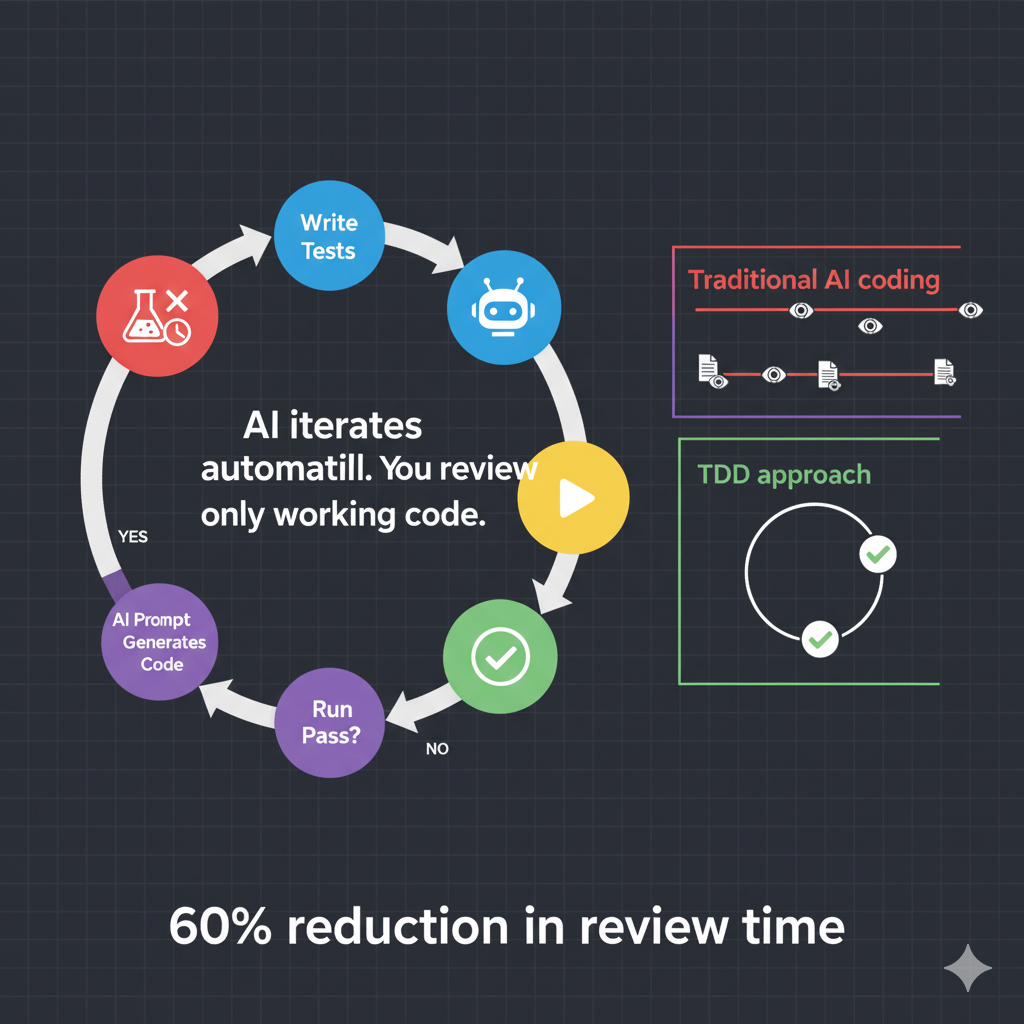
The most effective pattern for AI-assisted development is Test-Driven Development. Tests become guardrails that prevent AI from going off track.
The TDD Workflow:
Write tests first (you or AI can write them)
Ensure tests fail (validates they're real tests)
Prompt AI to implement the feature
Let AI iterate on test failures automatically
Review only after all tests pass
Example:
# You write this first:
def test_password_hashing():
    password = "SecurePass123!"
    hashed = hash_password(password)

    assert hashed != password
    assert hashed.startswith("$2b$")
    assert verify_password(password, hashed) is True
    assert verify_password("WrongPass", hashed) is False
Then prompt AI:
"Here are the tests for password hashing:
[paste tests]

Implement the hash_password and verify_password functions
to make these tests pass. Use bcrypt with 12 rounds minimum.
The tests must pass without modification."
AI generates the implementation. The tests either pass or fail. If they fail, AI iterates automatically based on the test feedback. You only review working code.
Benefits:
Tests provide objective success criteria
AI can self-correct through test feedback
You reduce review burden
Code is guaranteed to work as specified
 And here's the critical detail everyone misses: AI-generated tests need review too. I've seen AI generate tests that always pass regardless of whether the code is correct. Always manually verify your test cases actually test what they claim to test.
The Anti-Hallucination Arsenal: Stopping AI From Making Things Up
Let's talk about one of AI's most dangerous quirks: hallucinations. AI will confidently suggest functions that don't exist, recommend package names that sound real but aren't, and invent APIs that have never existed.
The statistics are alarming: AI hallucinates non-existent packages 5.2% of the time for Python and 21.7% for JavaScript. One in five JavaScript package suggestions might be completely fake.
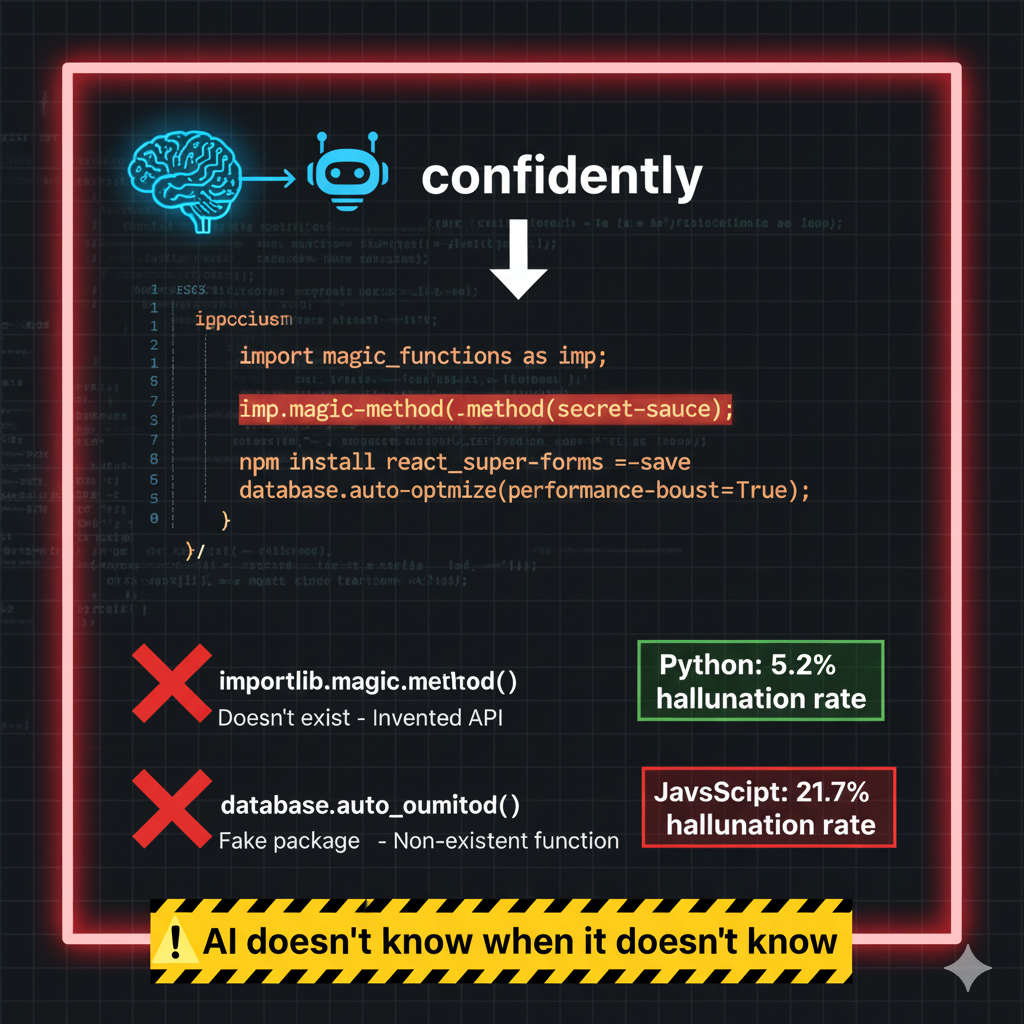 This opens you up to "slopsquatting" attacks - where malicious actors register those fake package names with malware, knowing developers will blindly install them.
Defense Layer 1: Request Citations
Add this to every prompt involving libraries:
"Provide official documentation links for any libraries you suggest.
List the exact package versions."
Then manually verify:
Package exists in official repository (PyPI, npm, etc.)
Version is recent and maintained
Documentation matches what AI described
Defense Layer 2: Chain-of-Thought Prompting
Force AI to explain its reasoning before writing code:
"Break down your approach step-by-step before implementing.
Explain why you're choosing each library and method."
Research shows this improves accuracy by 35% and reduces mathematical errors by 28%. When AI has to articulate its logic, it catches its own mistakes.
Defense Layer 3: Two-Stage Verification
Never accept code in one shot.
Stage 1 - Generate:
"Write a [language] function that [does X]"
Stage 2 - Security Review:
"Review the code above. Identify:
1. Security vulnerabilities
2. Missing input validation
3. Potential injection points
4. Hard-coded credentials
5. Inefficient patterns
Provide specific fixes for each issue found."
This mimics how human code review works and dramatically improves output quality.
Defense Layer 4: RAG (Retrieval Augmented Generation)
Give AI "sources of truth" - your vetted codebase, approved libraries, company standards.
Create a .cursor/rules or CLAUDE.md file in your project root:
# Project: MyApp

## Tech Stack
- Python 3.11
- FastAPI 0.104.1
- PostgreSQL 15

## Security Requirements (MANDATORY)
- All inputs validated using Pydantic models
- Parameterized queries only (use SQLAlchemy ORM)
- No hard-coded credentials
- bcrypt for password hashing (12 rounds minimum)

## Approved Dependencies Only
[List specific packages with versions]
- sqlalchemy==2.0.23
- fastapi==0.104.1
- pydantic==2.5.0
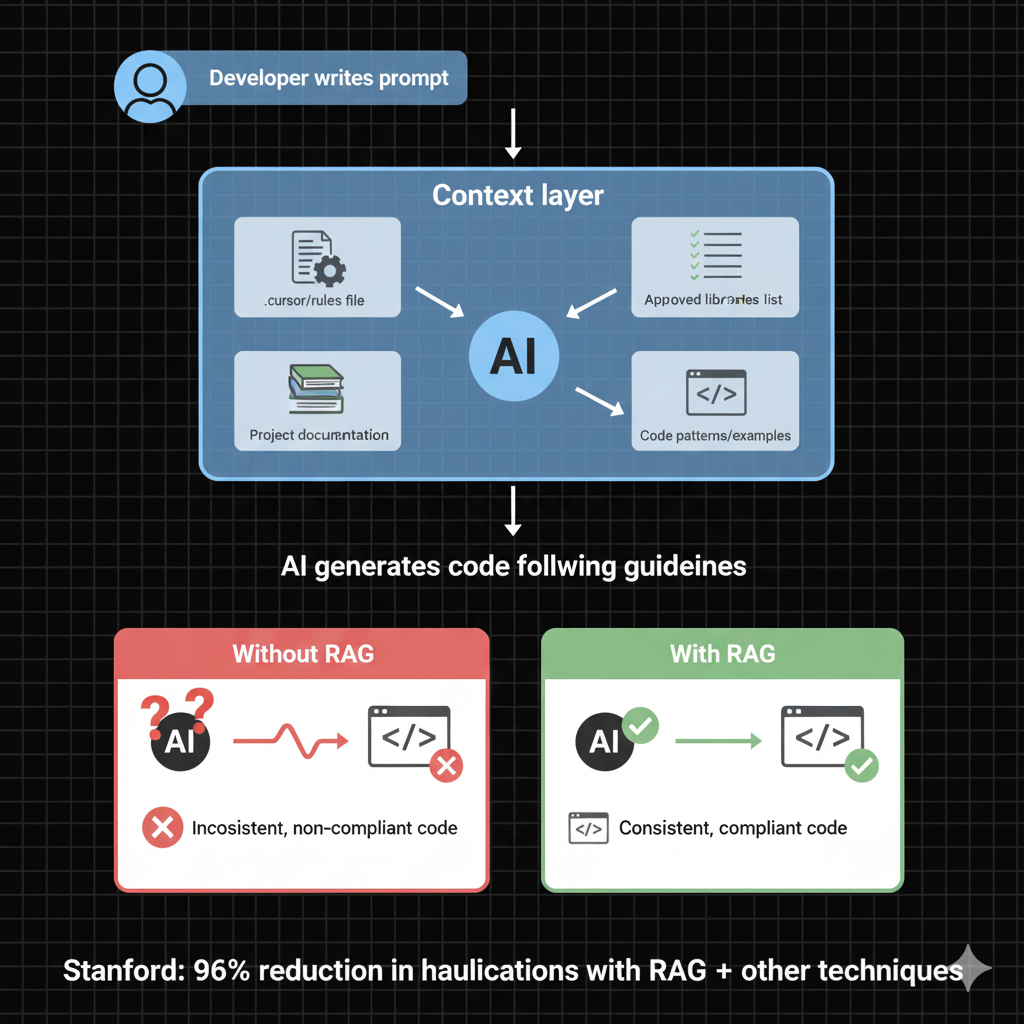 PostHog has 1.6 million lines of code. Their rules file is the only reason AI can navigate it effectively and produce consistent code.
Stanford research found: Combining RAG with other techniques achieves a 96% reduction in hallucinations.
Defense Layer 5: Formal Verification
Automated tools catch what humans miss.
For Python:
mypy .           # Type checking
ruff check .     # Linting
bandit .         # Security scanning
For TypeScript:
{
  "compilerOptions": {
    "strict": true,
    "noImplicitAny": true
  }
}
Never use any type - it defeats the purpose of TypeScript and hides bugs.
In CI/CD:
SAST (Static Application Security Testing) - SonarQube, Semgrep, CodeQL
SCA (Software Composition Analysis) - Snyk, Dependabot
DAST (Dynamic Application Security Testing) - OWASP ZAP
These layers catch 40% of hallucinations at compile-time and another 30% during security scans.
The mantra: Never trust. Always verify.
Production Security: The Five-Layer Defense
Security is where vibe coding fails hardest. We've established that 40-45% of AI-generated code has vulnerabilities. But there's something even more dangerous: developers produce less secure code with AI while feeling 3.5 times more confident it's secure (Stanford, 2024).
This is the deadly combination - incompetence masked by overconfidence.
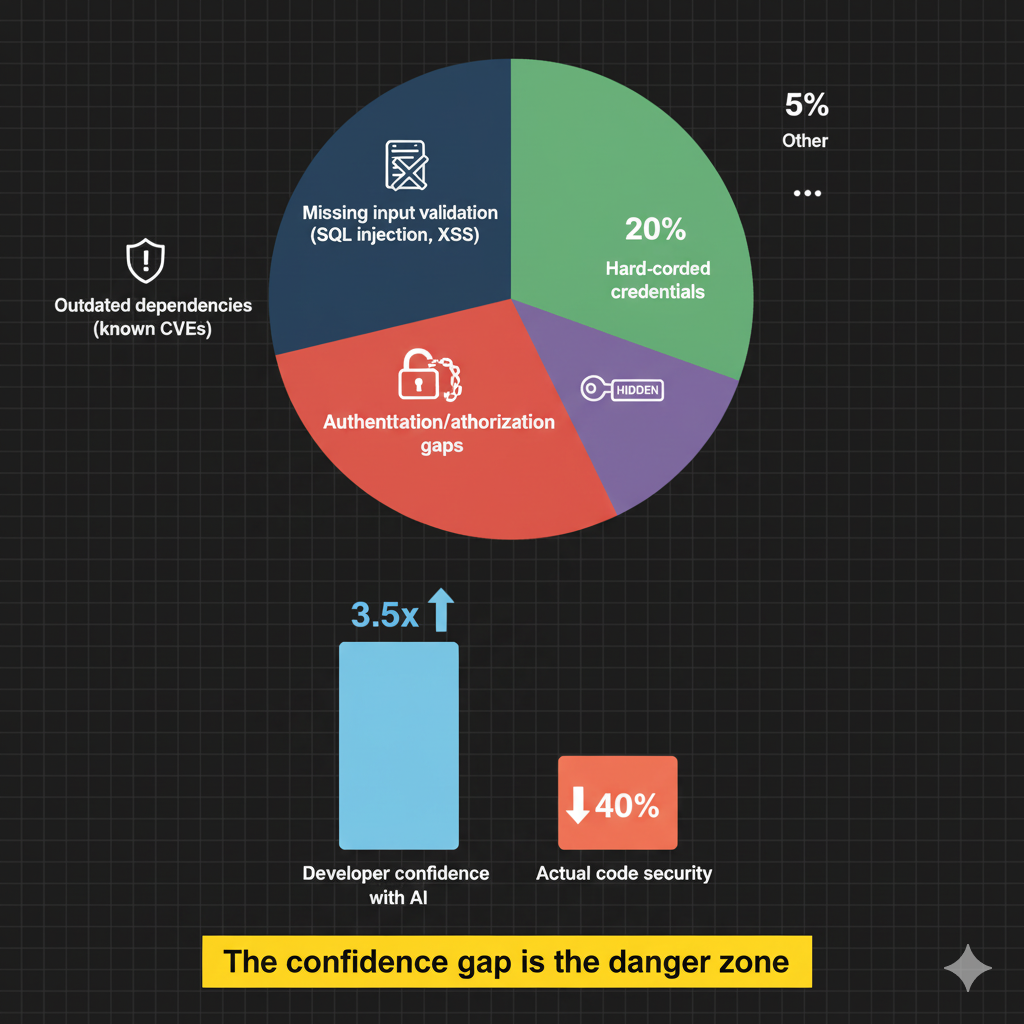
The Four Most Common Security Flaws
Missing input validation → SQL injection, XSS attacks
Hard-coded credentials → Exposed API keys, database passwords
Outdated dependencies → Known CVEs reintroduced
Missing authentication/authorization → Unrestricted access
AI doesn't naturally think about security. You must make it explicit.
The Security-First Prompt Template
Never assume AI knows security. Spell it out:
Write a [language] function for [task].

Security requirements:
- Validate all inputs using [specific validation method]
- Use parameterized queries (no string concatenation)
- No hard-coded credentials (use environment variables)
- Comprehensive error handling (no information leakage)
- Follow OWASP Top 10 guidelines for [relevant category]
- Rate limiting: [specify limits]

Provide code with inline security comments explaining each decision.
The Five-Layer Defense Strategy
Production systems require defense in depth. No single layer catches everything - multiple complementary checks provide robust protection.
Layer 1: Development Time
IDE security plugins (real-time feedback)
Linting (Ruff, ESLint)
Type checking (mypy, TypeScript)
AI-assisted code review suggestions
Layer 2: Pre-Commit
Git hooks validation
Secret scanning (prevent credential commits)
Local test execution
Code formatting
Layer 3: CI/CD Pipeline
SAST scanning (CodeQL, Semgrep, SonarQube)
SCA for dependencies (Snyk, Dependabot)
Unit and integration tests
Code coverage analysis (minimum 80%)
Security policy enforcement
Layer 4: Staging/Pre-Production
DAST in ephemeral environments
Integration testing
Performance testing
Security testing (OWASP ZAP)
Load testing
Layer 5: Production
Web Application Firewall (WAF)
Runtime monitoring
Anomaly detection
Incident response procedures
Continuous security validation
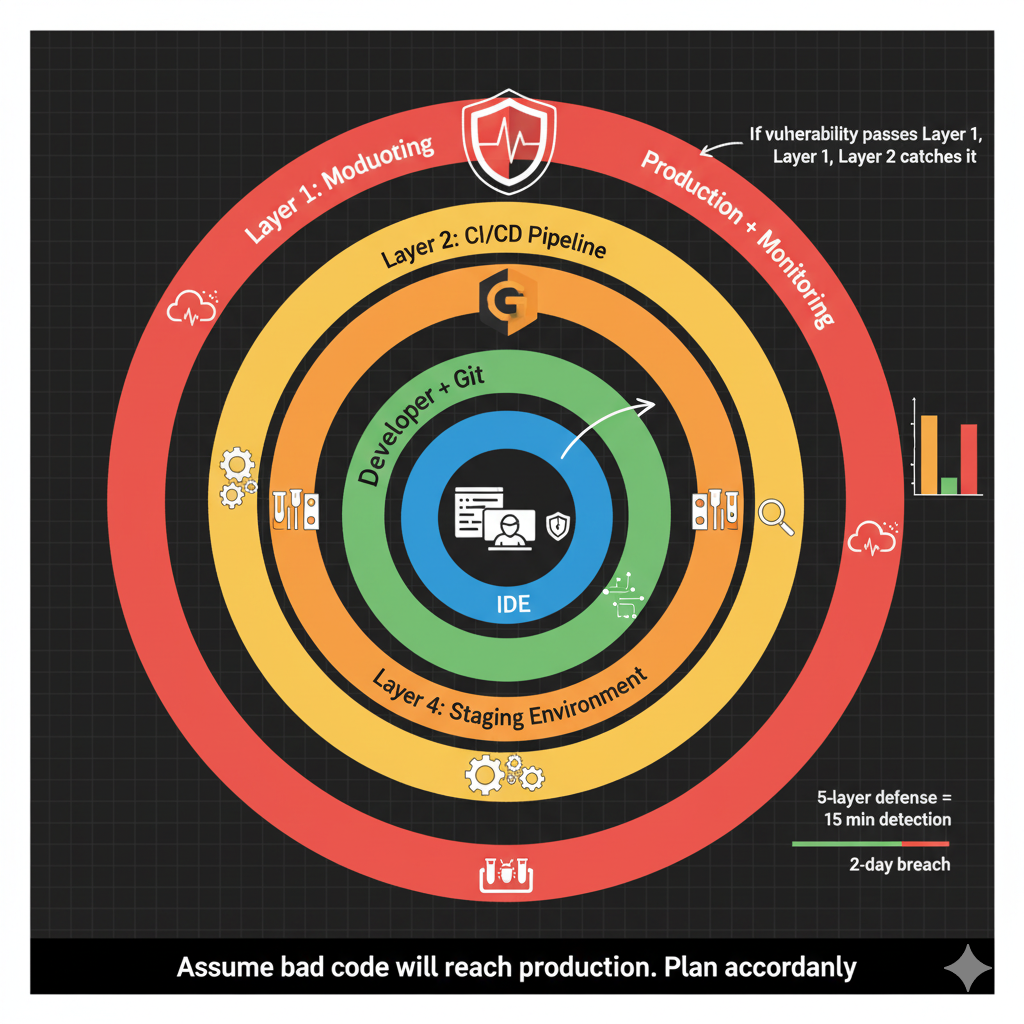 Critical insight: Assume some bad code will reach production despite all this. That's not pessimism - that's reality. Plan for it with:
Comprehensive monitoring
Rapid rollback capabilities
Incident response procedures
Automated alerting
When (not if) something goes wrong, you need to detect and respond in minutes, not days.
The Seven Deadly Sins of Vibe Coding
Let me save you from the mistakes I see constantly. These are the patterns that turn promising projects into production nightmares.
Sin #1: Vague Prompts in Large Codebases
The mistake: "Refactor this"
AI gets lost in large codebases without specific guidance. It doesn't know which patterns to follow, which files are related, or what "better" means in your context.
The fix: Reference specific files, functions, and patterns.
"Refactor the user authentication flow in backend/app/auth/routes.py
to use the repository pattern like backend/app/users/repository.py.
Specifically move database queries from the route handler to a new
AuthRepository class. Maintain existing error handling behavior."
Sin #2: Accepting Without Understanding
The mistake: Clicking "Accept" on AI-generated code you don't understand because it seems to work.
The red flag test: If you can't explain how the code works to a colleague, you're not ready to ship it.
The fix: Mandatory comprehension checks before approval. Require developers to:
Explain the code's logic in plain English
Identify edge cases and error handling
Describe what could go wrong in production
Walk through a debugging scenario
If they can't do this, send it back for revision or learning.
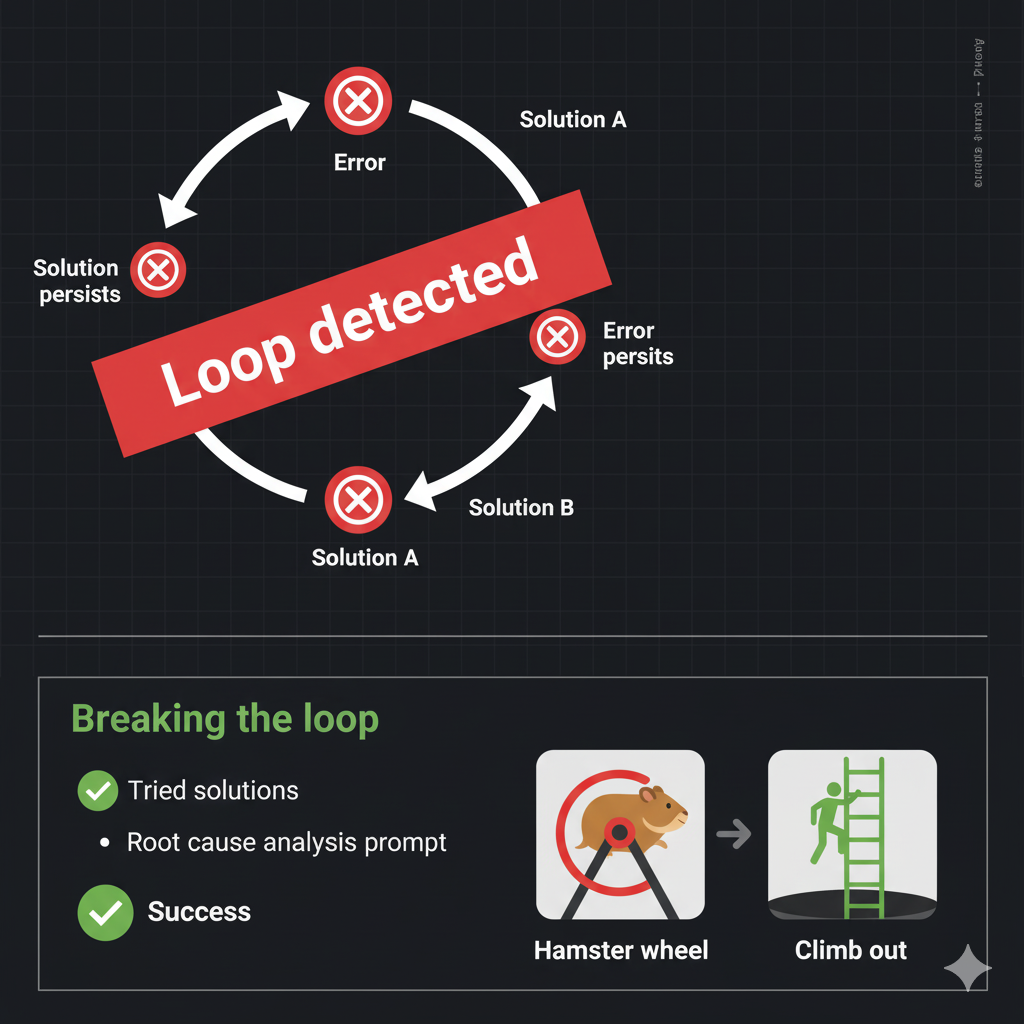
Sin #3: The Jump-to-Solutions Loop
The pattern:
Error X occurs
AI suggests: Try solution A
Error X persists
AI suggests: Try solution B
Error X persists
AI suggests: Try solution A again
[Infinite loop]
AI aims to please and will try the same solutions repeatedly without deeper analysis.
The fix: When stuck in a loop, explicitly state what you've already tried:
"I'm getting error X. I've already tried:
- Solution A (didn't work because Y)
- Solution B (didn't work because Z)

Analyze the ROOT CAUSE of error X. Don't suggest A or B again.
Consider [provide relevant context about your system]."
Force AI to think deeper rather than generate reflexive solutions.
Sin #4: Generating Too Much at Once
The mistake: "Build a complete user authentication system"
AI generates 500 lines of code. Something breaks. You have no idea which of the 500 lines caused the problem.
The fix: One function at a time. Test each. Then move to the next.
Step 1: "Write password hashing function" → Test → Commit
Step 2: "Write token generation function" → Test → Commit
Step 3: "Write registration endpoint" → Test → Commit
When something breaks, you know exactly which change caused it.
Sin #5: No Version Control / Checkpoints
The mistake: Making multiple changes without Git commits. AI breaks your app. You want to roll back but your last commit was three hours ago.
The fix: Git commit at every milestone (every 15-30 minutes).
git add .
git commit -m "feat: Add password hashing with bcrypt"
When AI breaks something (and it will), you want to revert to five minutes ago, not start over from scratch.
Sin #6: Using AI for What It Can't Do Well
AI struggles with:
Complex concurrency and race conditions
Large architectural changes
Unfamiliar languages with small ecosystems
Performance-critical algorithms
Domain-specific business logic
AI excels at:
Autocomplete and boilerplate
Standard patterns (CRUD, REST APIs)
Test case variations
Documentation and comments
Code translation between languages
Rubber-ducking (explaining problems)
The fix: Match the tool to the task. Use AI for what it does well. Code manually for complex concurrency and architecture.
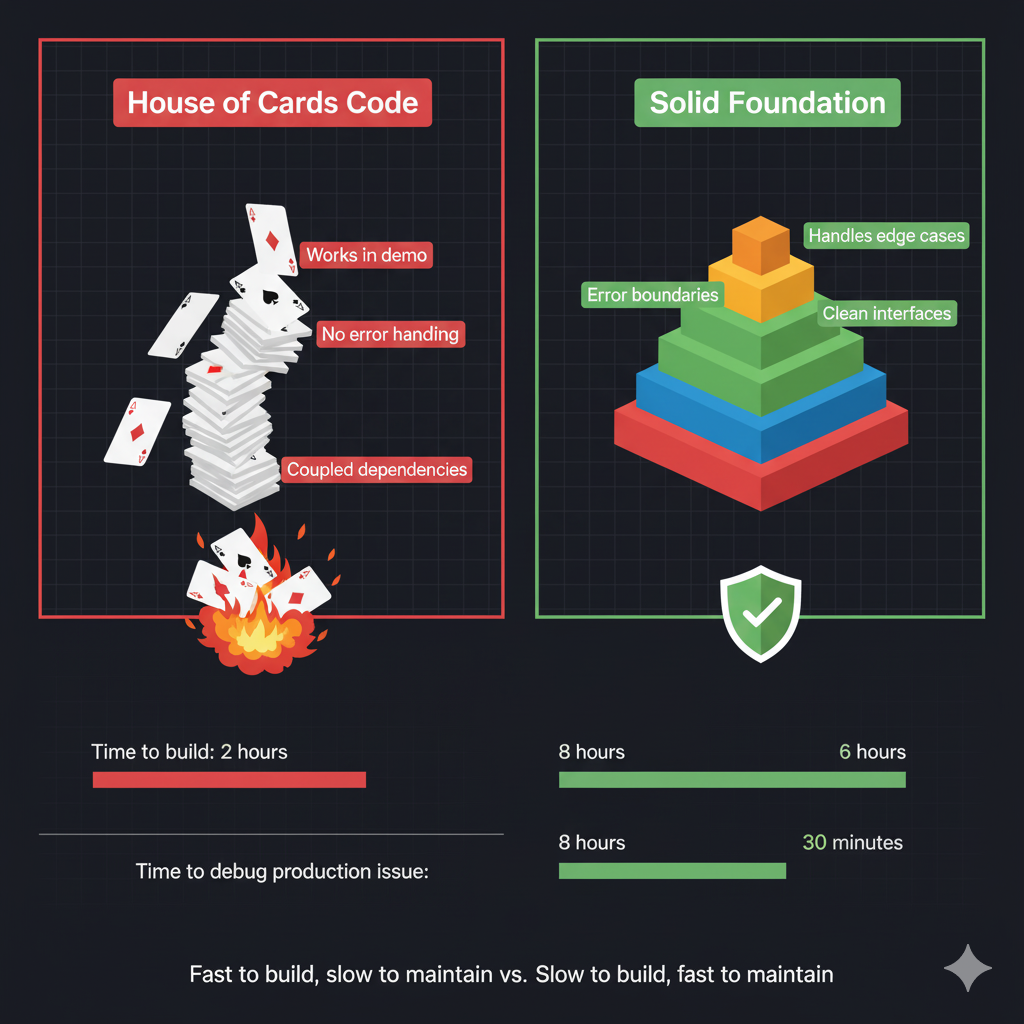
Sin #7: "House of Cards Code"
The symptom: Code that looks complete but collapses under real-world pressure. It works in the happy path but fails on edge cases, can't handle scale, and is impossible to debug when things go wrong.
The cause: Accepting AI output without applying engineering wisdom.
The fix: Continuous refactoring.
Break code into small, focused files
Maintain clear architectural boundaries
Add comprehensive edge case handling
Strengthen type definitions
Question architectural decisions
Document the "why" behind complex logic
 The mantra: The goal isn't to write code faster. The goal is to build better software.
Real-World Examples: What Actually Works in Production
Let's look at what companies shipping real production code with AI assistance actually do differently.
Cursor at Enterprise Scale
Coinbase: 100% of engineers have used Cursor. It's the preferred IDE for most developers. According to their engineering blog: "Single engineers are now refactoring, upgrading, or building new codebases in days instead of months."
Stripe: Patrick Collison (CEO) testified that "Cursor quickly grew from hundreds to thousands of extremely enthusiastic Stripe employees" with "significant economic outcomes when making R&D process more efficient."
Trimble: With 800+ engineers deployed:
25%+ increase in PR volume
100%+ increase in average PR size
"Shipping about 50% more code"
Shopify: 70%+ engineer adoption with "meaningful gains in day-to-day development, faster execution on large-scale migrations, increased rate of debugging, and even faster onboarding."
Claude Code Cross-Functional Impact
At Anthropic (the company that makes Claude):
20% of engineering team used it Day 1
50% adoption by Day 5
Now a production tool used company-wide
But here's what's interesting: it's not just engineers.
Legal team (no coding background): Built prototype "phone tree" systems connecting team members to the right lawyer for specific questions.
Growth marketing team: Built agentic workflows processing CSV files with hundreds of ads, identifying underperformers, and generating new variations. What took hours now takes minutes. They even built a Figma plugin generating 100 ad variations in 0.5 seconds.
Data scientists: Building entire React applications for visualizations with no TypeScript knowledge required. One-shot prompting creates complete applications.
Security engineering: Transformed their workflow from "design doc → janky code → refactor → give up on tests" to "pseudocode → test-driven development → reliable code." Stack trace analysis reduced debugging time 3x (from 10-15 minutes to 3-5 minutes).
What They Do Differently
1. They create context files
.cursor/rules or CLAUDE.md files with:
Language-specific patterns
Project structure overview
Approved libraries (with versions)
Security requirements
Naming conventions
Examples of existing patterns
2. They require mandatory security review
Every AI-generated change gets reviewed by:
A human developer (comprehension check)
An AI sub-agent (security specialist)
Automated security scanning tools
3. They made deterministic checks MORE important
With AI generating more code:
Linting became mandatory, not optional
Type checking coverage increased
Test coverage requirements went up (80%+ minimum)
Automated security scanning on every commit
The insight: AI makes quality gates MORE important, not less. Google is preparing for 10x more code to be shipped - they're scaling their automated checking proportionally.
4. They use Test-Driven Development
Tests act as guardrails:
Write tests first that fail
Let AI implement the feature
AI iterates on test failures automatically
Human reviews only after tests pass
5. They budget appropriately
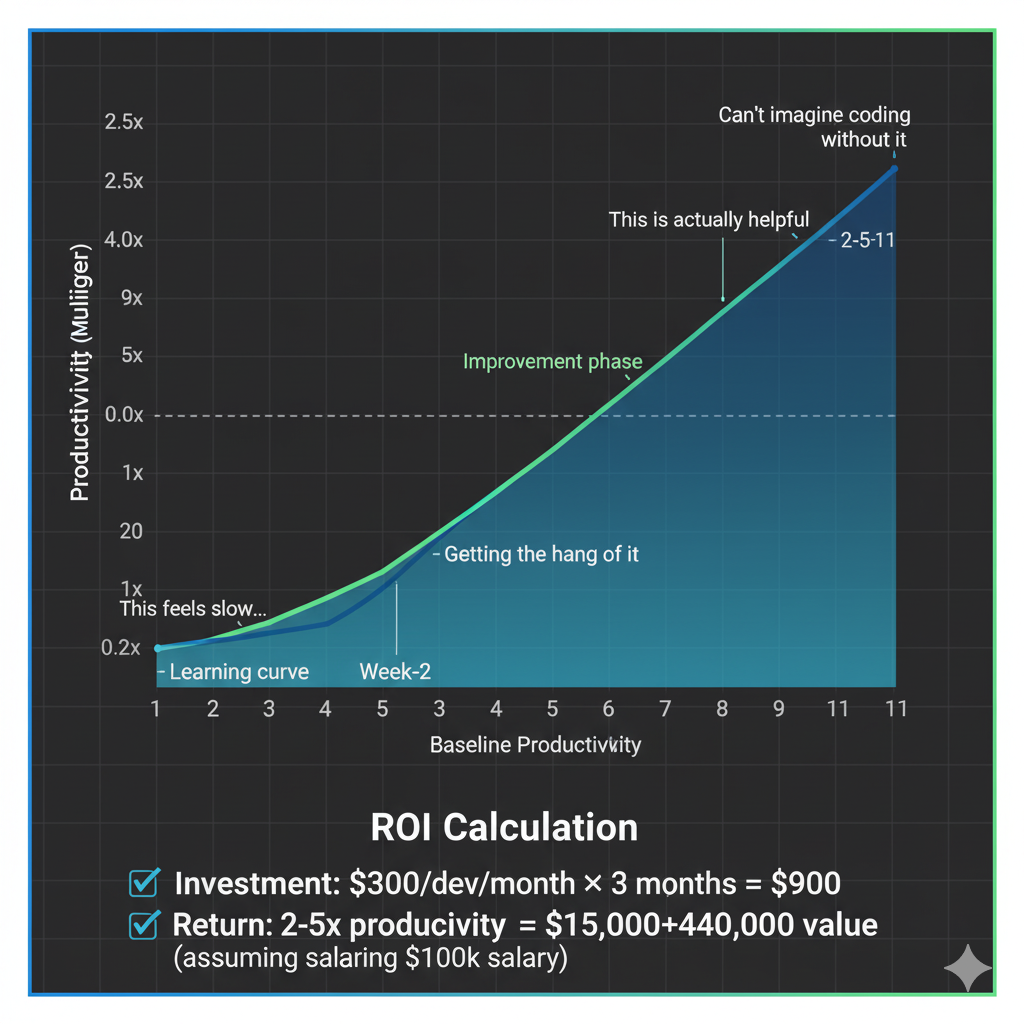
PostHog recommendation: $300 per developer per month for AI tools.
This includes:
Premium AI coding assistants (Cursor Pro, Claude Pro, Copilot)
Security scanning tools
Code review automation
Testing tools
They view it as a 2-5x productivity multiplier, which makes the ROI obvious.
6. They give it time
Timeline reality: Teams need an average of 11 weeks to fully realize AI tool benefits.
It's not "pick up and go" - it requires:
Deliberate practice
Workflow integration
Building institutional knowledge
Adjusting processes
Learning what works and what doesn't
 The key insight from all these examples:
Best results come from AI + engineering discipline, not AI instead of engineering discipline.
These teams didn't lower their standards. They maintained rigorous practices while using AI to accelerate the routine parts. They didn't replace code review - they augmented it. They didn't skip testing - they generated more tests. They didn't ignore security - they added more security layers.
Your Implementation Plan: From Zero to Production in Four Weeks
Theory is nice. But how do you actually start doing this tomorrow? Here's the proven four-week plan for individual developers to achieve proficiency with AI-assisted coding.
Week 1: Foundation
Goal: Master the basics without causing damage.
Monday-Tuesday: Prompt Engineering Boot Camp
Practice the four-component prompt structure (Context, Instruction, Constraints, Format)
Create 10 prompts for tasks you do regularly
Compare results from vague prompts vs structured prompts
Build a personal prompt template library
Wednesday-Thursday: Safe Experimentation
Use AI for autocomplete only
Review every suggestion before accepting
Keep a log: What suggestions were good? Which were dangerous?
Practice saying "no" to AI suggestions
Friday: Foundation Setting
Create your first
CLAUDE.mdfile for a personal projectDocument your coding standards
List approved dependencies
Define security requirements
Weekend: Reflect on what surprised you. What did AI do well? What made you uncomfortable?
Week 2: Expansion
Goal: Increase usage while maintaining quality.
Monday: Test-Driven Development
Pick a simple feature (e.g., input validation function)
Write tests first
Prompt AI to implement
Iterate until tests pass
Celebrate when it works on the third try instead of the first
Tuesday-Wednesday: Project Context
Expand your
CLAUDE.mdwith:Common patterns in your codebase
Error handling conventions
Performance requirements
Database query patterns
Test if AI suggestions improve
Thursday: Mode Experimentation
Try inline completion for simple tasks
Try agent/composer mode for multi-file changes
Try chat mode for understanding existing code
Identify which mode works for which task type
Friday: Documentation Day
Document what's working in a "What I Learned" file
Share insights with team (if applicable)
Update your prompt templates with improvements
Week 3: Integration
Goal: Make AI a seamless part of your workflow.
Monday: Security Integration
Set up security scanning in your CI/CD
Python: bandit, safety
JavaScript: npm audit, snyk
Run against existing code
Fix critical issues
Tuesday: Sub-Agents
Create specialized prompts for:
Security review
Code review
Test generation
Documentation
Save these as reusable commands
Wednesday: Linting and Type Checking
Mandate type checking (mypy for Python, strict mode for TypeScript)
Set up linting with auto-fix
Integrate into pre-commit hooks
Watch how this catches AI mistakes
Thursday: Iterative Refinement Practice
Take a complex feature
Break into 5-10 small tasks
Complete each with the TDD workflow
Measure time-to-completion vs your historical average
Friday: Checkpoint Review
Run full security scan on week's work
Check test coverage (aim for 80%+)
Review git history - are commits atomic and meaningful?
Identify bottlenecks in your workflow
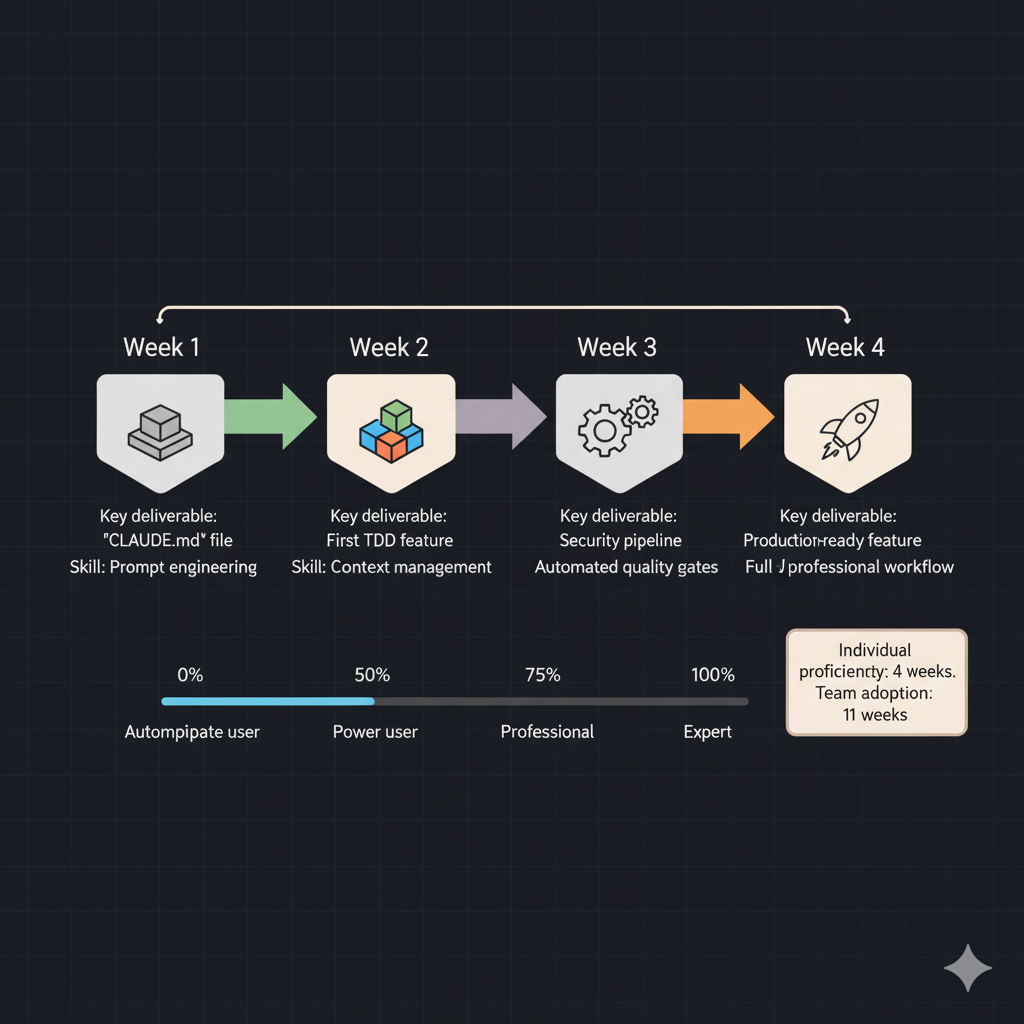
Week 4: Optimization
Goal: Reach professional-level proficiency.
Monday: Model-Specific Features
If using Claude: Learn XML tag patterns, thinking modes
If using Cursor: Master Composer mode, codebase search
If using Copilot: Understand workspace context, slash commands
Optimize prompts for your specific tool
Tuesday: Feedback Loops
Implement acceptance rate tracking
Note which prompts produce best results
Identify patterns in failed suggestions
Adjust your approach based on data
Wednesday: Pattern Recognition
What does AI struggle with in your codebase?
Where should you always code manually?
What tasks are 10x faster with AI?
Document these insights
Thursday: Team Knowledge Sharing
If working on a team, prepare a 15-minute presentation
Share what works, what doesn't
Demo your best prompts
Discuss challenges collectively
Friday: Production Feature
Complete one full feature using everything you've learned:
Plan architecture first
Write tests before code
Use AI for implementation
Security review with AI
Static analysis
Integration testing
Deploy to production
Measure: Was this faster? Was quality maintained?
Weekend: Reflect on the entire month. You now have skills that 90% of developers lack. You're not just writing code faster - you're writing better code with AI assistance.
Measuring Success: Know If It's Working
How do you know if your AI-assisted development practice is actually working or if you're just accumulating technical debt faster?
Productivity Metrics
PR Volume and Size
Track: Pull requests per week
Track: Average lines of code per PR
Expected: 25-50% increase in volume
Warning sign: 300%+ increase (might be low-quality code)
Time to Complete Features
Measure: Hours from task assignment to merge
Expected: 2-3x improvement for routine features
Warning sign: No improvement (not using AI effectively)
Onboarding Time
Measure: Time for new developer to submit first PR
Expected: 3 weeks → 3-5 days
This validates your context files and documentation
Quality Metrics
Test Coverage
Track: Percentage of codebase covered by tests
Target: 80%+ maintained or increased
Warning sign: Coverage decreasing (tests not keeping up with code generation)
Bug Reports Post-Deployment
Track: Number of bugs reported within 7 days of deployment
Expected: Maintained or decreased
Warning sign: Increased bug rate (accepting low-quality AI code)
Revert Rate
Track: Percentage of commits reverted within 2 weeks
Target: < 3% (industry average with manual coding)
Warning sign: > 7% (the current AI coding average - you're doing it wrong)
Security Vulnerabilities
Track: Number of vulnerabilities found by security scanners
Target: Decreased over time (better prompts, better review)
Warning sign: Increased vulnerabilities (skipping security reviews)
Adoption Metrics
Developer Satisfaction
Survey: "Does AI assistance improve your development experience?"
Target: 70%+ positive responses
Warning sign: < 50% positive (workflow problems, tool problems, or poor training)
Acceptance Rate
Track: Percentage of AI suggestions accepted vs rejected
Expected: 30-70% (varies by task complexity)
Warning sign: > 90% (blindly accepting everything) or < 20% (not using effectively)
Time Distribution
Track: Time writing code vs reviewing code vs debugging
Expected shift: Less time writing, more time reviewing and architecting
This is a good sign - you're moving up the value chain
The Ultimate Metric: Production Stability
The only metric that truly matters: Is production more stable or less stable than before AI-assisted development?
Track these production indicators:
Mean Time Between Failures (MTBF)
Mean Time To Recovery (MTTR)
Error rates in logs
Customer-reported issues
Incidents requiring emergency fixes
If these are improving or stable: Your AI-assisted development practice is working.
If these are deteriorating: You're shipping faster but not better. Time to increase review rigor and quality gates.
Common Questions and Concerns
"Isn't this just autocomplete? Why the big deal?"
No. Autocomplete suggests the next line. AI coding assistants can generate entire features, refactor across multiple files, write comprehensive tests, and understand complex context.
The difference: Autocomplete works on syntax. AI assistants work on semantics and architecture.
But here's the critical nuance: Just because AI can generate entire features doesn't mean you should let it. The professional approach is to use AI like a really smart autocomplete - for small, specific tasks with clear constraints.
"Won't this make me a worse developer?"
Only if you use it wrong.
Wrong way: Blindly accepting everything AI generates, never understanding the code, never learning the underlying concepts.
Right way: Using AI to handle boilerplate and routine patterns while you focus on architecture, business logic, and complex problem-solving. You're moving up the value chain, not down.
Think of it like calculators didn't make mathematicians worse at math - they freed them from arithmetic to focus on proofs and theory.
The skill that matters now: Knowing what good code looks like and being able to evaluate AI suggestions against that standard.
"My company won't pay for AI tools"
The ROI math is simple:
Cost: $300/developer/month for tools Return: 2-5x productivity increase
For a $100k/year developer:
Monthly cost: $8,333
2x productivity = $16,666/month value
Tool cost: $300/month
Net gain: $8,333/month ($100k/year)
If your company won't invest $300/month to potentially double productivity, that's a management problem, not a tools problem.
Free alternatives exist: GitHub Copilot has a free tier, Claude has limited free usage, and open-source models are catching up fast. Start with free tools to prove the concept, then make the business case for premium tools.
"What about data privacy and IP concerns?"
Legitimate concern. Here's the risk matrix:
High-risk data:
Proprietary algorithms
Customer data
Trade secrets
Security credentials
Medium-risk data:
Business logic specific to your company
Internal APIs
Configuration details
Low-risk data:
Standard patterns (CRUD, auth, etc.)
Open-source library usage
Common web development patterns
Risk mitigation strategies:
Use local/self-hosted models for high-risk code
Scrub sensitive data before prompting
Use tools with business agreements (GitHub Copilot Business, Claude for Enterprise)
Review terms of service carefully
Never paste production credentials into AI tools
Most enterprise AI tools now offer:
No data retention
No training on your code
Encryption in transit and at rest
SOC 2 compliance
"AI keeps suggesting outdated patterns"
This happens because of training data cutoff dates. Fixes:
Specify versions explicitly in prompts:
"Using React 18.2 with hooks (not class components),
implement a form with validation."
Include recent documentation in context: Link to current docs in your prompts or add to context files
Use models with recent training data: Claude Sonnet 4 (January 2025 cutoff) vs older models
Provide examples of modern patterns: Show AI how you want it done in your codebase
"Our codebase is too complex for AI"
PostHog has 1.6 million lines of code. They make it work.
The secret: Comprehensive context management.
Create detailed context files explaining:
Architecture decisions
Module relationships
Common patterns
Where things live
Why things are implemented certain ways
For truly complex legacy codebases:
Start with new features (greenfield)
Gradually use AI for refactoring
Build up institutional knowledge in context files
Let AI help you document the complexity
The complexity isn't the blocker - lack of context is.
The Skills That Matter in an AI-Augmented World
Let's talk about what skills actually matter when AI can write most of your code.
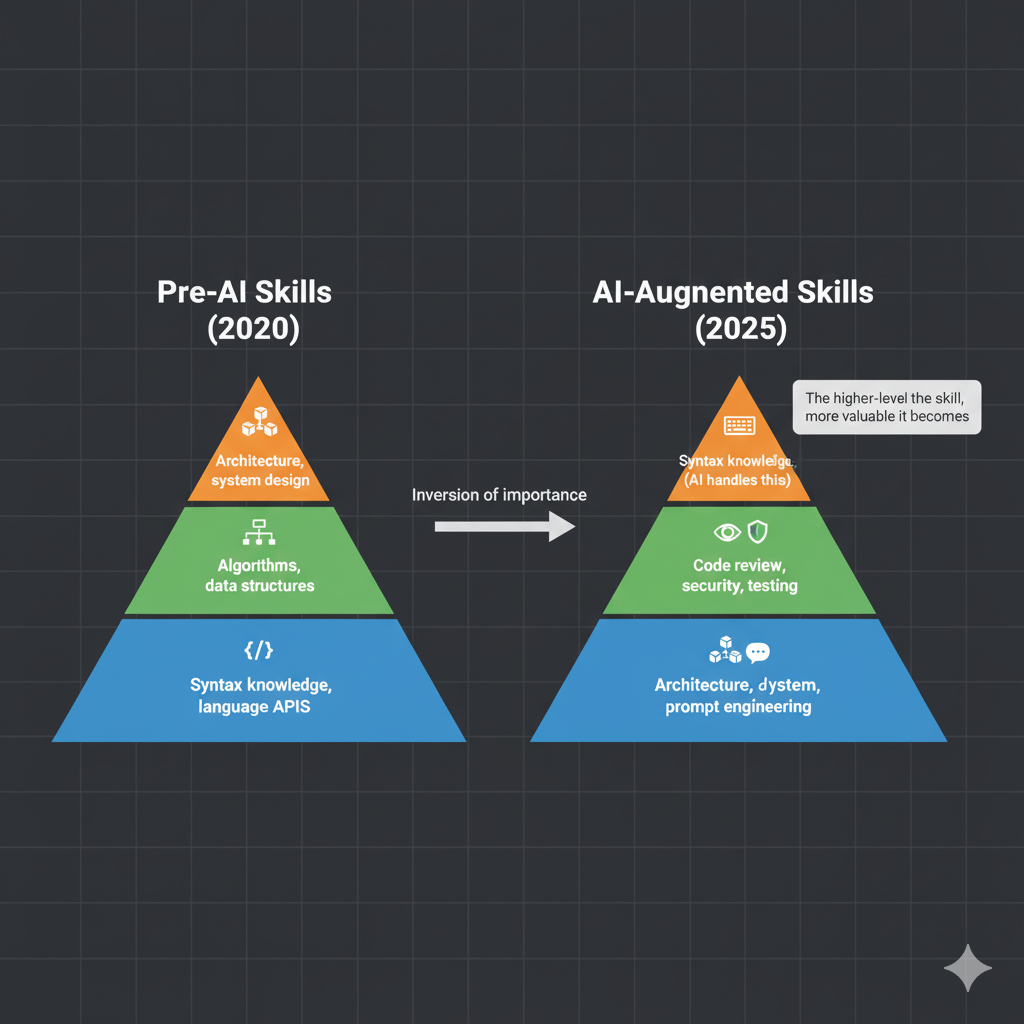
Technical Skills That Increased in Value
1. Prompt Engineering The new core competency. Knowing how to structure prompts, provide context, and constrain outputs is now as important as knowing how to write loops used to be.
2. Code Review You're reviewing 5x more code than before (because AI generates it fast). Spotting bugs, security issues, and design flaws in others' code (including AI) is critical.
3. Testing and Validation Knowing what to test and how to write comprehensive test cases is more valuable than ever. AI can help write tests, but you need to know if they're good tests.
4. Security Awareness Understanding common vulnerabilities (OWASP Top 10) and secure coding practices is now mandatory, not optional. You can't rely on AI to "just know" security.
5. Architecture and System Design This is where humans still dominate. AI can implement your architecture, but it can't design a system that scales or makes appropriate trade-offs for your specific business needs.
Technical Skills That Decreased in Value
1. Syntax Memorization You don't need to remember every API method anymore. AI knows syntax cold.
2. Boilerplate Code Writing Writing repetitive CRUD operations, standard API endpoints, and configuration files is now AI's job, not yours.
3. Documentation Reading (Partially) AI can summarize documentation for you. You still need to verify it's correct, but you don't need to read through 200 pages of docs to find one method.
4. Debugging Typos AI catches typos as you type. Spending time fixing semicolons and bracket mismatches is largely obsolete.
Soft Skills That Became Critical
1. Communication and Specification If you can't clearly articulate what you want, AI can't help you. The ability to write clear, specific requirements is now a core engineering skill.
2. Judgment and Evaluation Knowing when AI suggestions are good vs. dangerous requires judgment that only comes with experience. This is impossible to automate.
3. Continuous Learning AI tools evolve monthly. Models improve. New patterns emerge. You need to stay current or you'll fall behind fast.
4. Teaching and Mentoring Juniors need guidance more than ever because they're exposed to AI-generated code they might not understand. Teaching becomes more important, not less.
5. Critical Thinking Questioning AI suggestions, identifying edge cases, and anticipating what could go wrong requires critical thinking that AI doesn't have.
The New Career Ladder
Traditional path: Junior → Mid-level → Senior → Staff → Principal Focus: Technical depth, code volume, feature delivery
AI-augmented path: Prompt Engineer → AI-Assisted Developer → AI Architect → Systems Designer Focus: Architecture, judgment, quality, and strategic direction
The developers thriving in this new world aren't the ones writing the most code - they're the ones making the best architectural decisions and catching the most bugs before they reach production.
The Truth About AI and Developer Jobs
Let's address the elephant in the room: Will AI replace developers?
Short answer: No, but it will replace developers who only write code.
Long answer: The role is evolving, not disappearing.
What's Actually Happening
Jobs eliminated: None (so far). Developer unemployment remains at historic lows (< 2%).
Jobs transformed: All of them. Every developer now works with AI assistance to some degree.
New jobs created:
AI Code Reviewers
Prompt Engineering Specialists
AI Security Auditors
AI Training Data Engineers
Context Engineering Specialists
The Uncomfortable Reality
The bottom 10% of developers (those who only copy-paste code without understanding) are in danger. If your entire value proposition is "I can translate requirements into syntax," AI does that better than you.
The top 10% of developers (architects, system designers, problem solvers) are more valuable than ever. They use AI to handle the routine parts while focusing on the complex architectural and business problems that AI can't solve.
The middle 80% need to decide which direction they're moving.
What This Means for Your Career
If you're early career: Focus on fundamentals. Don't skip learning data structures, algorithms, and system design just because AI can generate code. You need the mental models to evaluate AI suggestions.
If you're mid-career: Double down on architecture and system design. Move up the abstraction ladder. Let AI handle implementation details while you focus on big-picture problems.
If you're senior: Mentor others on how to use AI effectively. Your judgment and pattern recognition are more valuable than ever. Share that knowledge.
The Skills Investment Strategy
Invest heavily in:
System design and architecture
Security and code review
Prompt engineering and AI collaboration
Domain expertise in your industry
Communication and leadership
Invest moderately in:
New languages and frameworks (AI makes learning easier)
Testing and validation strategies
DevOps and infrastructure
Stop investing in:
Syntax memorization
Repetitive boilerplate patterns
Manual documentation writing
Framework-specific minutiae that change yearly
The Path Forward: Practical Next Steps
You've read 10,000+ words about vibe coding. Now what?
Tomorrow (30 minutes)
Pick one small task from your current project
Write requirements.md describing what it should do
Write a structured prompt with Context, Instruction, Constraints, Format
Let AI generate the code
Review it line by line - can you explain every line?
Write tests (or test the code thoroughly)
Git commit with descriptive message
Goal: Complete one task using the professional framework. Get a feel for the workflow.
This Week (5 hours)
Create CLAUDE.md for your main project
Set up security scanning in your CI/CD
Install linting and type checking (mypy for Python, strict TypeScript)
Complete 5 tasks using the TDD workflow
Document what worked and what didn't
Goal: Establish the basic infrastructure for professional AI-assisted development.
This Month (20 hours)
Complete the 4-week implementation plan from earlier in this article
Track your metrics - PR velocity, bug rate, revert rate
Build your prompt library - save prompts that work well
Share learnings with your team (if applicable)
Ship one complete feature to production using AI assistance
Goal: Achieve individual proficiency with AI-assisted development.
This Quarter (40+ hours)
Mentor others on your team
Contribute to team context files and documentation
Measure ROI - compare velocity and quality before and after
Advocate for team adoption with data and case studies
Stay current with new tools and techniques
Goal: Transform your entire team's development practice.
The Long Game (Career)
Move up the abstraction ladder - focus more on architecture, less on implementation
Build expertise in evaluating AI-generated code for security and quality
Develop judgment about when to use AI and when to code manually
Become the expert your organization relies on for AI-assisted development
Share publicly - blog posts, talks, open-source contributions
Goal: Position yourself as a leader in the AI-augmented development era.
Conclusion: The Real Story
Here's what this article is really about:
It's not about AI replacing developers. It's about raising the bar for what "professional development" means.
In 2020, a professional developer:
Wrote clean code
Wrote tests
Did code review
Followed security best practices
In 2025, a professional developer:
Designs architecture (AI implements it)
Writes tests first (AI generates code to pass them)
Reviews 5x more code (AI generates it fast)
Explicitly mandates security (AI doesn't assume it)
Validates everything (AI makes confident mistakes)
Maintains context files (AI needs direction)
Makes judgment calls (AI can't evaluate trade-offs)
The bar didn't lower. It raised. We're expected to do more, faster, with higher quality.
The developers who thrive are those who embrace this reality and develop the skills to master AI collaboration while strengthening their engineering fundamentals.
The developers who struggle are those who either:
Reject AI entirely and get left behind in velocity
Accept AI blindly and accumulate technical debt
Assume AI makes fundamentals optional and lose the ability to evaluate quality
The Final Truth
AI won't replace developers who can engineer.
AI will replace developers who only write code.
The difference? Engineering is about:
Making trade-offs
Understanding implications
Designing systems
Evaluating quality
Anticipating failure modes
Balancing competing requirements
These are deeply human skills that require judgment, experience, and wisdom.
Writing code is just one small part of engineering. It happens to be the part AI can help with the most.
So the question isn't "Will AI replace me?"
The question is "Am I engineering, or am I just writing code?"
If you're engineering, AI makes you more powerful. If you're just writing code, you're in trouble.
Resources for Going Deeper
Official Documentation:
Security Tools:
Static Analysis: SonarQube, Semgrep, CodeQL, Bandit (Python), ESLint (JavaScript)
Dependency Scanning: Snyk, Dependabot, Safety (Python)
Dynamic Testing: OWASP ZAP, Burp Suite
Code Review Tools:
Qodo Merge (AI code review)
CodeRabbit (AI PR reviews)
Pull Sense (context-aware reviews)
ReviewBoard (traditional)
Testing Tools:
TestGen-LLM (Meta's unit test generator)
Cover-Agent (open-source test generation)
Pytest (Python), Jest (JavaScript)
GitHub Copilot (test generation capabilities)
Research Papers:
Stanford: "AI-Assisted Programming and Code Security" (2024)
Georgetown CSET: "Cybersecurity Risks of AI-Generated Code" (2024)
ACM: "Nonsense and Malicious Packages: LLM Hallucinations in Code Generation"
arXiv: "Test-Driven Development for Code Generation" (2024)
Community Resources:
Simon Willison's blog - Thoughtful analysis of AI coding
PostHog Engineering Blog - Real production experiences
GitHub's AI Engineering Blog - Scale experiences
Start Here:
Create a CLAUDE.md file for your project (today)
Write one feature using TDD with AI (this week)
Set up security scanning (this week)
Track your metrics (this month)
Share your learnings (this quarter)
The bottom line: Vibe coding can be professional, production-ready, and secure - but only if you do it right.
This article showed you how the best teams in the world do it right.
Now it's your turn.
Start tomorrow. Ship better code. Engineer, don't just code.
Have questions or experiences to share? The conversation about AI-assisted development is evolving daily. Your insights matter.
Filed under: Products & Agents